
Why is your Salesforce so slow? The answer is usually these 4 things.
Page load drag, duplicate records, and governor limit errors don't just frustrate your reps. They cost you deals.
If your Salesforce users are complaining about slow load times, you've probably heard the same workaround: "Just give it a second." That's not a solution. The average Salesforce org accumulates years of technical debt: redundant automations, bloated page layouts, inefficient queries, and data models that stopped making sense three reorgs ago.
This post breaks down what's actually dragging your CRM down, what compliance-related performance traps look like, and what to prioritize first if you want to see real improvement without blowing up your existing setup.
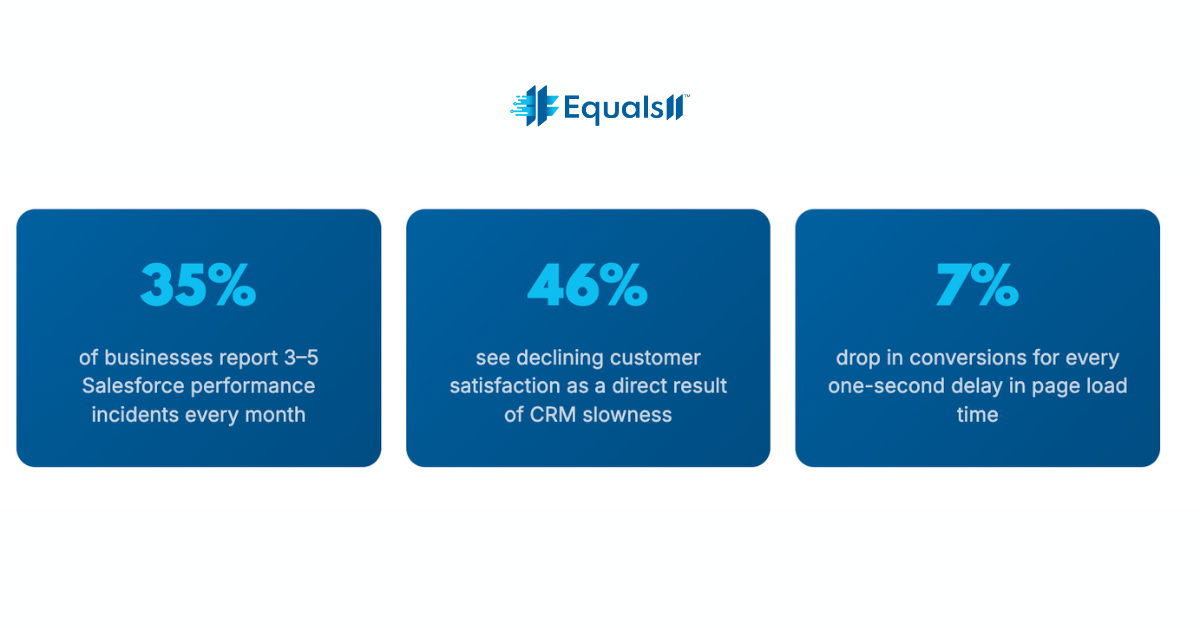
The real causes of a slow Salesforce org
Most performance problems don't come from one smoking gun. They're the result of compounding decisions made over years, each one reasonable at the time, all of them adding up to an org that grinds when your sales team needs it to fly.
1. Inefficient SOQL queries and missing indexes
When your Apex code runs unselective queries, pulling broad record sets without proper WHERE clauses or relying on fields without custom indexes, every database lookup takes longer than it should. At low data volumes, this is invisible. Once you cross 100,000+ records, it becomes a daily source of frustration and the occasional "maximum CPU time exceeded" error that brings workflows to a halt.
2. Bloated page layouts and unused Lightning components
Every field you add to a record page is a request Salesforce has to fulfill on load. Page layouts that were built for "we might need this someday" thinking carry real costs at render time. Unused Lightning components, especially third-party ones loaded regardless of context, compound the problem on every page view.
3. Recursive triggers and automation conflicts
Overlapping workflow rules, Process Builder automations, and Flows that weren't designed to work together create cascading execution chains. One record save can trigger a dozen automations in sequence. This is one of the most common sources of governor limit errors, and it gets worse every time someone adds a new automation without auditing what's already running.
4. Data volume without data hygiene
Duplicate records, orphaned data, and poorly structured sharing rules don't just make reporting unreliable. They slow down every query that touches that data. Salesforce has to evaluate more rows, apply more sharing calculations, and surface more redundant records in every search, report, and list view your users run.
The performance-compliance connection most teams miss
The part that doesn't come up in most Salesforce optimization conversations: many of the same architectural decisions that slow your org down also create compliance exposure.
Field-level security settings that are too permissive push extra data into record views that users don't need and shouldn't have. Overly broad sharing rules force Salesforce to evaluate complex permission hierarchies on every data access. Legacy integrations that haven't been reviewed for data residency create both a performance bottleneck and a potential compliance gap.
A note on regulated industries: For healthcare and nonprofit organizations, two areas Equals11 works in heavily, these aren't theoretical concerns. HIPAA-adjacent data handling, grant reporting requirements, and constituent data governance all have direct implications for how your org should be structured. A slow Salesforce org in those environments is often a signal that the underlying architecture needs both a performance and a compliance review at the same time.
What to actually fix first (Prioritized)
When we do a Salesforce health check at Equals11, we triage by impact and reversibility. Here's the order that tends to produce results fastest:
Run the Salesforce Optimizer. It's free, built-in, and surfaces the highest-impact issues (unused fields, inactive automations, permission set gaps) in one report. Do this before anything else.
Audit and consolidate your automations. Map every trigger, Flow, and workflow rule that fires on your highest-volume objects. Eliminate duplicates and convert old Process Builder automations to Flows before they become a liability.
Add custom indexes to frequently queried fields. Any field that appears regularly in WHERE clauses, reports, or list views and isn't already indexed is leaving performance on the table. Submit an index request to Salesforce support, as it's a low-effort, high-return fix.
Simplify page layouts per persona. Strip record pages down to what each user role actually needs. Use Dynamic Forms to load fields conditionally rather than rendering everything on every load.
Deduplicate your data before you scale anything. AI features, predictive scoring, and Einstein analytics all degrade in quality when built on top of messy data. Clean data isn't just a performance issue, it's a prerequisite for every advanced capability you want to use.
Review and tighten your sharing model. Simpler sharing rules mean faster data access. Start with your highest-volume objects and work outward from there.
When performance optimization unlocks aI
There's a reason we spend time on data quality and org performance before we talk about Einstein AI or Agentforce. Predictive lead scoring is only as good as the records it's scoring. Next Best Action recommendations only matter if your reps see them in a page that loads fast enough to use in an actual customer call.
The organizations that get real value from Salesforce AI aren't the ones who installed it first. They're the ones who built a clean, fast, well-structured foundation before they did. Performance optimization and AI readiness are the same project. Most teams just don't realize it until they try to do AI first and wonder why it isn't working.
What we've seen in practice: When the National Kidney Foundation brought Equals11 in to rework their Salesforce instance, the goal was better constituent engagement. But the first deliverable was data cleanup and structural optimization, because without that, none of the AI-driven "Next Best Actions" would have had reliable data to act on. The performance work came first. The AI results followed.
The 90-day reality check
Performance improvements in Salesforce aren't always instant, but the meaningful ones compound quickly. In our experience, organizations that prioritize the fixes above, especially automation consolidation and data deduplication, see measurable user adoption improvements within the first month. Pipeline reporting accuracy tends to follow within 90 days. The AI features that felt out of reach often become viable shortly after that.
The blocker isn't usually knowledge or budget. It's knowing where to start without breaking things that are already working. That's exactly where an outside set of eyes, backed by 600+ certified Salesforce engineers, can move the needle faster than internal teams working around their own constraints.Your Salesforce can run faster. We'll run a health check, show you exactly what's slowing you down, and map out the fixes worth doing. Book a free consultation →
