
Shadow CRM is killing your Salesforce ROI. How to spot it and shut it down.
Your team has Salesforce. They also have a Google Sheet called "Real Pipeline." A Notion page with the actual account list. A WhatsApp group where the deals get discussed. A Trello board that the BDRs trust more than the Lead object. Three reps who track their commissions in their own personal Excel files because they do not believe the dashboards.
That is shadow CRM. And if your org has been live on Salesforce for more than two years, you have it. The only question is how much of it.
Shadow CRM is the hidden tax on your Salesforce investment. You pay for licenses. You pay for admins. You pay for integrations. Then your team quietly rebuilds the system in tools you do not control, with data you cannot govern and decisions you cannot trace. Every spreadsheet outside Salesforce is a data quality problem, an adoption problem, a compliance problem, and an AI readiness problem stacked into one.
How to recognize shadow CRM in your org
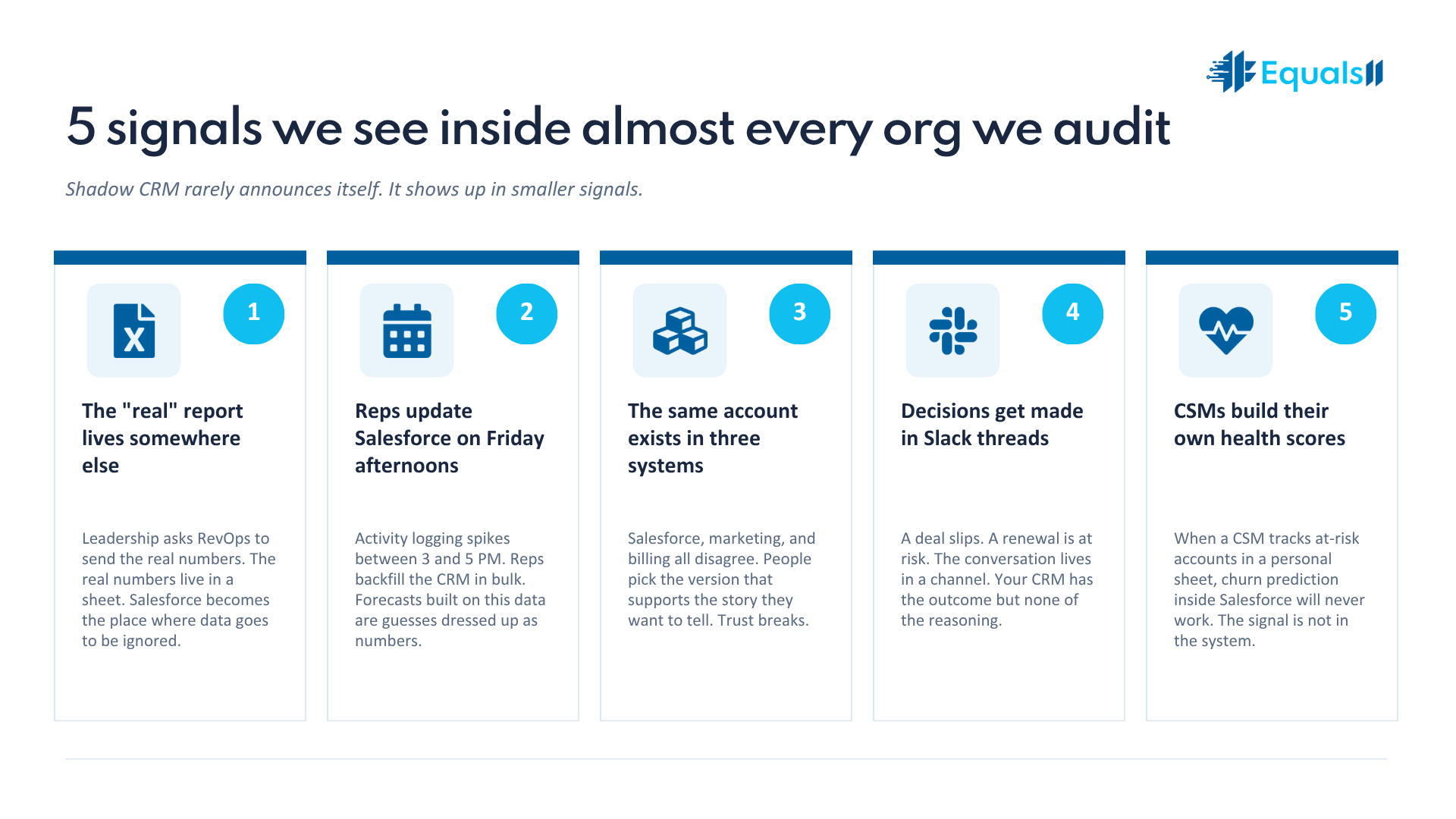
Shadow CRM rarely announces itself. Nobody walks into a leadership meeting and says "I do not trust Salesforce, so I built my own version." It shows up in smaller signals. Here are the ones we see inside almost every org we audit.
The "real" report lives somewhere else. Sales leadership gets a Salesforce dashboard. Then they ask the RevOps lead to "send me the real numbers." The real numbers live in a sheet. The sheet is updated manually. The sheet is the source of truth. Salesforce becomes the place where data goes to be ignored.
Your reps update Salesforce on Friday afternoons. If activity logging spikes every Friday between 3 and 5 PM, your reps are not selling inside Salesforce. They are doing the bare minimum to look compliant before the weekend. The actual work happens somewhere else all week, then gets backfilled into the CRM in bulk. Forecasts built on this data are guesses dressed up as numbers.
The same account exists in three systems. One in Salesforce. One in a marketing platform that nobody synced properly. One in a billing system the finance team manages alone. When the systems disagree, people pick the one that supports the story they want to tell.
Decisions get made in Slack threads. A deal slips. A renewal is at risk. A customer churns. The conversation happens in a channel, not on a record. By the time someone updates Salesforce, the context is lost. Your CRM has the outcome but none of the reasoning.
Your CSMs build their own health scores. Customer Success teams are usually the canary in the coal mine. When a CSM tells you "I have my own way of tracking which accounts are at risk," that is shadow CRM. It also means churn prediction inside Salesforce will never work, because the signal data is not in the system.
Why shadow CRM happens
Shadow CRM is almost never a discipline problem. It is a design problem. Reps and CSMs are practical people. If a tool helps them do their job, they use it. If it does not, they replace it. So when you see workarounds, ask what failed first.
Five common root causes:
Salesforce was built for the manager, not the rep. Required fields exist to make reports prettier, not to help the rep close deals. So the rep fills them out at the end of the week with whatever gets the page to save.
The data model fights the actual sales motion. Your team sells in pods, but Opportunity Owner is a single user field. Your team works on multi-stakeholder deals, but Contact Roles are not enforced. Your team has a usage-based pricing model, but the Opportunity object was built for fixed-price SaaS. Reps work around the model because the model does not work for them.
Reporting is unreliable. A leader runs a pipeline report and the number is wrong. They ask why. Nobody can explain the discrepancy. Trust breaks. Within a quarter, that leader has a side spreadsheet. Within two quarters, the whole team does.
Updates take too long. If logging an activity takes seven clicks and a 30-second page load, the rep finds a faster path. That path is usually outside Salesforce.
Nobody owns the system. When there is no clear owner for the org, decisions stall. New requests pile up. Workarounds become permanent. Shadow CRM fills the vacuum that governance was supposed to fill.
Why this is more dangerous than it looks
A spreadsheet on someone's desktop seems harmless. It is not. Here is what shadow CRM actually costs you.
Your forecasts are wrong. If 30 percent of your real pipeline data lives outside Salesforce, your forecast accuracy is capped no matter how good your model is. You are forecasting on a partial picture.
You cannot enable AI. Einstein, Agentforce, and Data Cloud all assume Salesforce holds the truth. When the truth is split across spreadsheets, Slack, and someone's Notion page, every AI output is built on incomplete signal. Predictions degrade. Recommendations miss context. Agents give wrong answers with confidence. The hype around AI inside Salesforce assumes you have done the boring work of consolidating where data lives. Shadow CRM is the boring work you skipped.
Your compliance posture is exposed. HIPAA, SOC 2, GDPR, and CCPA all assume you can produce a defensible record of where customer data lives and who touched it. A spreadsheet on a personal Google Drive cannot satisfy any of those frameworks. Auditors do not care that "we use Salesforce." They care where the data actually lives.
You lose institutional memory. When a rep leaves, their personal sheet leaves with them. The pipeline context, the relationship history, the deal nuances. All gone. Salesforce was supposed to prevent exactly this. Shadow CRM hands the problem back to you.
You pay twice. You pay for Salesforce licenses you are not fully using. You pay for the time your team spends maintaining parallel systems. You pay again when leadership commissions a "transformation project" to fix what was a governance problem all along.
How to fix it
You do not fix shadow CRM by sending an email that says "stop the spreadsheets." You fix it by closing the gaps that pushed your team out of Salesforce in the first place.
Step one. Find the spreadsheets. Ask your reps and CSMs directly. Not in a survey. In a conversation. "Show me the file you actually use to track your pipeline." They will usually tell you. The ones who hesitate are the ones whose workarounds are most entrenched. You cannot redesign what you cannot see.
Step two. Audit why each one exists. Every shadow tool is a feature request your Salesforce org failed to fulfill. Catalogue them. A pipeline sheet usually points to a reporting failure. A renewal tracker points to a missing object or a missing field. A territory sheet points to assignment logic that does not match the real sales motion. Treat each spreadsheet as a clue.
Step three. Fix the highest-leverage gaps first. You will not bring every workaround back into Salesforce in one sprint. Pick the three that affect forecasting and revenue most directly. Redesign the model, fields, or reports to make the workaround unnecessary. Then watch whether the spreadsheet usage drops. If it does not, you have not actually solved the problem.
Step four. Make the right path the easy path. If updating a record takes seven clicks, your reps will avoid it. Use page layouts, dynamic forms, and quick actions to reduce friction. Mobile experience matters here. A rep in a parking lot before a meeting will not log into a desktop browser. They will text their manager. Then nothing gets recorded.
Step five. Govern what you build. Shadow CRM grows back if there is no owner. Assign someone accountable for org health. Run a quarterly review of new workarounds. Make data ownership part of how teams are evaluated, not a side request from IT.
What this looks like when it works
When shadow CRM is gone, three things change. Your forecast meeting stops being an argument about whose number is right. Your AI rollout stops stalling on data quality issues that nobody can quite explain. And your team stops feeling like Salesforce is something they have to feed, and starts using it like a tool that helps them do their job.
That is what Salesforce was supposed to do in the first place.
Frequently asked questions about shadow CRM
What is shadow CRM?
Shadow CRM is any system, spreadsheet, or tool your team uses to track customer, pipeline, or revenue data outside of your official CRM. Inside a Salesforce environment, it usually shows up as Google Sheets, Excel files, Notion pages, Slack threads, Trello boards, or personal trackers that hold the data your team actually trusts. The official system says one thing. The shadow system says another. The shadow system usually wins.
How is shadow CRM different from data silos?
Data silos are systems that do not talk to each other but were sanctioned by the business. A billing platform that does not sync to Salesforce is a silo. Shadow CRM is unsanctioned. It exists because users built it on their own to work around something Salesforce was not doing for them. Silos are an integration problem. Shadow CRM is a design and adoption problem.
How do I know if my team is running shadow CRM?
Five signals to watch for. Leadership asks for the "real" pipeline number outside of Salesforce. Reps update records in bulk on Friday afternoons. The same account exists in three systems with three different statuses. Deal context lives in Slack threads, not on the Opportunity record. CSMs maintain their own account health scores in personal sheets. If you see two or more of these, you have shadow CRM.
Why do reps stop using Salesforce?
Reps stop using Salesforce when the system slows them down more than it helps them. Common reasons include slow page loads, too many required fields, a data model that does not fit the actual sales motion, weak mobile experience, and reports they do not trust. Reps are practical. If the tool fights them, they replace it.
Does shadow CRM affect Salesforce AI tools like Einstein and Agentforce?
Yes. Salesforce AI tools assume the data inside Salesforce represents the truth. When 20 to 40 percent of your real revenue signal lives in spreadsheets, Slack, and personal trackers, every prediction, recommendation, and AI agent output is built on partial data. Einstein scoring drops in accuracy. Agentforce gives confident answers based on incomplete records. Data Cloud unification fails because the source data was never centralized. Cleaning up shadow CRM is a prerequisite for any serious AI rollout.
Is shadow CRM a compliance risk?
Yes. HIPAA, SOC 2, GDPR, and CCPA all require you to know where regulated data lives and who has accessed it. A spreadsheet on a personal Google Drive or a CSV on a rep's laptop fails every one of those frameworks. Auditors care about where the data actually is, not where you say it should be.
How long does it take to clean up shadow CRM inside Salesforce?
It depends on how deep it goes. A focused cleanup of the top three friction areas, the ones tied to forecasting and revenue reporting, usually takes 6 to 10 weeks. A full org redesign that addresses adoption, governance, and architecture across all teams typically runs 3 to 6 months. The pace depends on how clearly the gaps are documented before work starts. Skip the audit and you skip the leverage.
Should I cleanup or redesign?
Cleanup makes sense when the architecture is sound and the data is just messy. Redesign is the right move when the underlying data model does not match how the business operates today. If reps keep building workarounds in the same places after every cleanup, that is a redesign signal. We covered this in detail in our post on Salesforce data cleanup vs. data redesign.
Who owns fixing shadow CRM?
In healthy orgs, RevOps owns the workflow design, IT or a Salesforce architect owns the technical build, and a single accountable owner sits over governance. In orgs with persistent shadow CRM, nobody owns it. That is usually the root cause. Assign one owner before you assign one fix.
Can a Salesforce consulting partner help fix shadow CRM?
Yes, and this is one of the most common reasons orgs bring us in. We start by mapping where the workarounds live, why they exist, and what they are costing. Then we redesign the parts of the org that pushed users out in the first place. The goal is to make Salesforce the easy path again so the spreadsheets fade on their own.
Where to start: the Free Salesforce Health Check
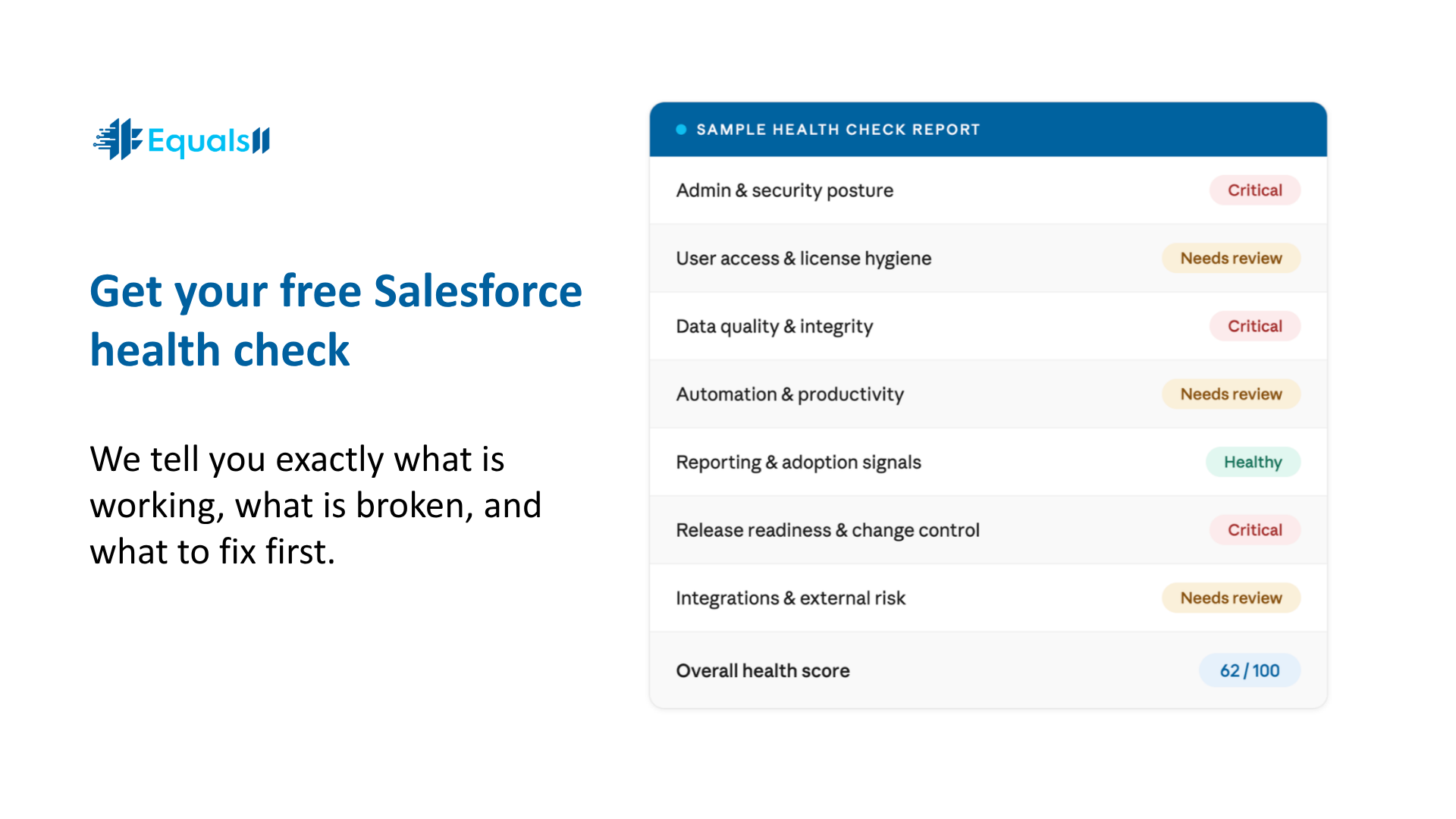
If you suspect shadow CRM is dragging on your org but you do not know how deep it goes, start with a Free Health Check from Equals11. It takes two minutes to request. We follow up within one business day.
The Health Check gives you six deliverables in plain English, and they are actionable whether you work with us or not.
1. Revenue Visibility Score. How well your current setup surfaces pipeline and forecasting to leadership.
2. Top 3 Friction Points. The specific places slowing your team down right now.
3. Priority Fix Recommendation. One clear first move you can take, with or without us.
4. Admin Dependency Risk Flag. How exposed you are if your Salesforce knowledge walks out the door.
5. Shadow CRM Assessment. Whether your team is still running off spreadsheets behind Salesforce, and where the leaks are biggest.
6. Growth Stage Readiness. Whether your current setup is built to support your next revenue stage.
Real feedback from a recent Health Check client, the Executive Director of a $78M nonprofit: "We were paying a freelancer $4,500 a month to maintain something that was broken at the foundation. The Health Check made that obvious in one call."
Request your Free Health Check.
Salesforce is not expensive. Misalignment is. The spreadsheets are just where the misalignment shows up.
